My own website has run on Divi for as long as Divi has had a version number worth mentioning: Divi 3, then 4, then Divi 5. It was a good showcase for the work I do for clients, and Divi 5 is still a tool I recommend and build with. But my site had become the one project I never had time for. Every visit to the dashboard was a reminder: 24 active plugins, a page builder generating CSS at request time, security hardening layered on security hardening, and a performance score I had spent a ten-hour session dragging from 78 to 88.
In October 2026 I replaced it with plain HTML and CSS. No WordPress, no database, no page builder, no plugins. Every page is a file. This is what I did, what it measurably changed, and why it would be the wrong move for many of the businesses I work with.
All performance figures in this case study are from Google PageSpeed Insights, mobile.
The decision
The trigger was a redesign. I wanted a lighter, more consistent design, and I was weighing a custom theme against a code-only build. When I listed what my site actually needs to do, the list was short: show the work, explain the services, let me add pages and articles quickly, take a contact form, and load fast on a phone in a parking lot. Nothing on that list needs a CMS — and the one that mattered most to me, adding content quickly, is the one a static framework does best.
That is the part people miss about static sites. I did not move to one because my site rarely changes. I moved to one because I want to change it more: new service pages, new case studies, new articles, built from a reusable set of components by me and my AI assistant (I use and recommend Claude) in minutes instead of an afternoon in a page builder. A static site is perfect for a single author who wants as many pages and posts as they like. What it is not built for is many authors, editorial workflows, and layers of approval — more on that below.
Three reasons, then, in order: content velocity — I want to add pages and articles faster than a page builder lets me; performance — scores I never have to think about; and time — I do not have ten hours to spend optimizing my own website again. A static site is fast by nature, not by effort.
So the plan became: keep every URL, port every word of copy, rebuild the design once as a small stylesheet, and generate the pages with a 150-line build script. Launch only after I had reviewed every page on staging.
A word about Divi 5
I want to be fair to Divi, because I am a Divi specialist and I build client sites on Divi 5 every month. It is a powerful, extensible builder with a genuinely good visual editor, a theme builder, and a module ecosystem that fits a great many projects. For a client who wants to edit their own pages, it is one of the best tools there is.
For my site, four things worked against it:
- It is much slower than a static page. Not because Divi is badly made, but because it is doing a lot: generating layout CSS, loading its icon font, module scripts, and the extension scripts (lightboxes, popups, carousels) that come with the plugins around it. My site needed almost none of that on any given page.
- It is updated continually with new features. That is great for the product — and I use those features on client builds — but my own site needed maybe ten percent of them. Every update is still a test, a cache purge, and a check that nothing shifted.
- Cumulative Layout Shift. CLS is Google's measure of how much a page moves while it loads: the header that stacks vertically for a moment and then snaps into a row, the text that jumps down when an image above it finally gets its size. Google scores anything above 0.1 as needing improvement and above 0.25 as poor, because a moving page is a page you tap the wrong thing on. Full Divi 5 pages on my site sat at a CLS of about 0.67 — more than six times Google's threshold — mostly from the theme-builder header rendering as a vertical stack before its CSS arrived. A ten-hour session of overrides, preloads, and output filters got the home page to 0.016 for a few minutes after purging Divi's static CSS cache; then the cache regenerated and the shift came back. That is ten hours of fighting the tool for a result that did not hold.
- SVGs, in particular. SVG is the fastest, crispest image format there is: tiny files, perfect on any screen. Divi 5 could not reliably reserve space for them while the page loaded, so every SVG was a layout shift waiting to happen. On the static site every graphic is an SVG with real dimensions, and CLS is zero.
What it is now
- 37 pages, 1:1 with the old URLs — and growing all the time. Every service, location, specialist, and legal page, plus the blog and six articles. Two service URLs were flattened and 301-redirected; everything else kept its address.
- One stylesheet, one small script. The whole design system is a single 51 KB CSS file (10 KB compressed) with tokens for color, type, and spacing, light and dark mode, and the glass-card look. The site's only JavaScript is a 6 KB file (2 KB compressed) for the theme switch, mobile menu, contact form, and the blog filter — plus Google Analytics 4, which loads after the page is interactive.
- One PHP file. The contact form posts to a 170-line handler with a honeypot, rate limit, and a plain-text log. That is the entire back end.
- Built by a script. A Python build stitches the header, footer, and head into each page, writes the sitemap, stamps assets with a content hash so they can be cached for a year, and manages the server's
.htaccess. Posts and category pages come from a second script. Deploy is one command.
- Hosted on my own server on the same LiteSpeed VPS as my client sites.
Why static was the right call for this site
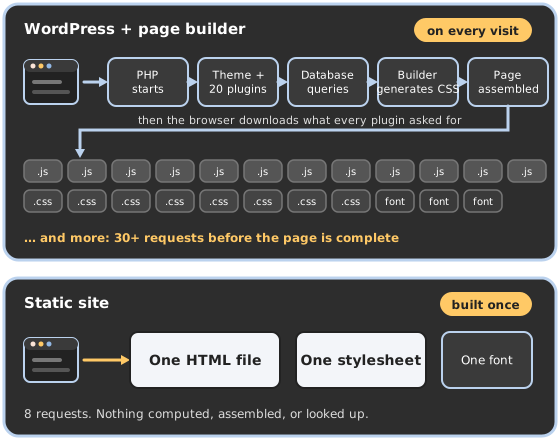
Speed is structural, not configured. There is no cache to warm, no cache to purge, no optimization plugin fighting another plugin. A page is a file; LiteSpeed sends it. That is why the scores are 98–100 without any of the tuning I do on WordPress sites — the ten-hour session above bought ten points; the static build gave the rest for free.
Zero layout shift, by design. Every image has its real width and height in the HTML, every SVG included. The header is one element with one layout. Nothing waits for a script to settle. CLS is not something I fixed; it is something that cannot happen.
Security by absence. Most WordPress attacks go after the login page, XML-RPC, outdated plugins, or the database. This site has none of those — there is no login and no account to hack, because there is nothing to log in to. The attack surface is a web server serving files and one form handler I wrote and can read in full. I still keep the server hardened — but I am no longer patching software weekly to protect a brochure site.
Consistency came free. When every component is defined once in a stylesheet, every page gets the same buttons, the same spacing, the same dark mode. On the Divi site, consistency was a discipline I had to maintain across 37 pages of builder settings. Here it is a property of the system.
Building out is fast — and that was the point. A new page is a file with a meta block and HTML that uses the existing components. The build script handles the chrome, the sitemap, and the cache headers. I added a Reviews page, a FAQs page, and a filterable blog during the rebuild because each one took minutes. This case study and the new service page it links to were built the same way.
It costs the server almost nothing. Serving a file is the cheapest thing a web server does. The site shares a VPS with client sites and is now effectively invisible in the resource graphs — no PHP workers, no database connections, no cron.
Editing it is a conversation. I built and launched this site in two days working with an AI assistant (I use and recommend Claude), and that is how it is maintained. A text change takes seconds. A new section, a new page, a new case study: I describe what I want and it is built from the same components as everything else — no builder settings to dig through, no plugin to configure. Plain HTML and CSS are the most legible format a model can work in, so every change is a diff I can read, check at five screen widths in both color modes, and deploy with one command. The same is true for a client who works with an AI assistant: you get more flexibility than a page builder gives you, not less, because nothing on the page is off-limits.
Where a static site is the wrong answer
I am a WordPress developer. I still build, host, and maintain WordPress sites for clients every week, and I will keep doing that, because many businesses need things a static site does not do well:
- Owners who want a visual, drag-and-drop editor and do not want to use an AI assistant. Every change on a static site goes through the files. With an AI assistant that is a sentence, not a skill; without one, it means waiting on me. If you or your staff want to open a page builder and move things around yourselves, you want WordPress.
- Dynamic content. E-commerce, memberships, bookings, user accounts, event calendars pulled from a feed, anything with a logged-in state or a search box over a large catalog. That is what a CMS and a database are for.
- Large editorial operations. A static blog is excellent for one author and as many posts as they care to write. It is not built for a newsroom: several authors, drafts in review, scheduled publishing, and layers of editorial control.
For my own site — one author, content I control, a form, and as many pages and articles as I want to add — none of those applied. The trade I made was giving up a dashboard I rarely opened in exchange for a site that is faster, safer, and cheaper to run than anything I could have built on a CMS — and easier to change, not harder.
What happens next
The old WordPress install is parked on the server as a rollback for a while, then it goes away. The staging copy stays as a test bed. New articles and pages get written as files. And when I quote a static build for a client now, I can point at the one I use myself.